
Casting in Hotels: Add to Your Existing TVs or Replace Them?
Four ways to bring casting into a hotel room — dongles, cloud casting, hotel TV platforms, semi-professional TVs. Costs, network requirements and what Netflix changed.
A guest calls reception asking how to get a film from their phone onto the TV in the room. The receptionist doesn’t know. The guest tries on their own, the TV “can’t see” the phone, and the evening ends with a laptop balanced on their knees.
This scene plays out in European hotels every day — not only in budget properties, but in freshly renovated four-star hotels too. Casting has stopped being a gadget; it has become an expectation as ordinary as working Wi-Fi. The question is no longer whether but how — and there are four answers, with very different costs and consequences. This article is meant to help you decide which one fits your hotel, and above all: whether it is worth adding anything to the TVs you already have, or whether you should replace them outright.
Why a home Chromecast is the wrong tool for a hotel
Start with what the guest expects. They have their own subscriptions on their phone — Netflix, YouTube, Disney+, Spotify, perhaps a sports platform. They have holiday photos they want to show the family on a big screen. In a business room, they have a presentation. In every one of these cases they want one thing: to tap the “cast” icon and see the picture on the TV. They don’t want to log in with the remote, type a password on an on-screen keyboard, or leave their credentials in someone else’s television.
Behind that simple icon sit three different technologies the guest knows nothing about — rightly so, because it isn’t their problem. Google Cast (colloquially “Chromecast”) serves Android phones and most streaming apps. AirPlay is the equivalent for iPhones and iPads. Miracast mirrors a screen, mainly from Windows laptops. A TV that is supposed to “just work for everyone” has to handle all three. That is the first criterion worth remembering.
The second criterion matters more, and it is where hotels that bought one Chromecast per room at an electronics store come unstuck. A consumer device assumes everyone on the network is one family. In a hotel, that means the guest in room 204 sees the TV from room 301 in their device list and can send whatever they like to it. It means nothing is cleared at checkout — the next guest finds someone else’s account, someone else’s viewing history, sometimes someone else’s photos. And it means nobody in the hotel has a single place to check whether casting in room 117 is working at all.
For the purposes of this comparison we will use the working term BeeCast (a label to organise the discussion, not a product name) for what separates hotel casting from home casting. Hotel casting is casting plus four things: pairing the phone only with the TV in the guest’s own room; privacy, meaning the session is wiped automatically at checkout; support for all three protocols; and management of the entire TV fleet from one panel. We will run the four available options through that checklist shortly.
Netflix — a special case you need to know about before you buy
Before the comparison, one development from recent months that has shifted the balance. Since December 2025, Netflix has disabled casting from its mobile app to most modern devices: the newer Chromecast with Google TV, TVs running Google TV or Android TV, and practically every smart TV that comes with its own remote. From a phone, Netflix can now only be cast to old third-generation Chromecasts (the ones without a remote, since discontinued) and a handful of specific TV models — and only on the Standard and Premium plans. On the ad-supported plan, Netflix casting does not work anywhere. Netflix dropped AirPlay even earlier, in 2019.
Netflix’s official advice to the viewer is: use the app on the TV and the remote. For hotels, Netflix runs a formal programme: guests must sign in with their own accounts (a shared hotel account risks being blocked), the TV must be certified for hospitality use, and the system must clear the guest’s data at checkout and report usage statistics. In practice this is done by professional hotel TV platforms — the hotel registers as an authorised user through the management panel, the guest signs in with a code from their phone, and everything disappears at checkout.
What does this mean for casting? Two things. First, the home Chromecast has become a dead end for Netflix — even if the guest can “see” it, the app will not show the cast icon. Second, professional hotel casting solutions still support Netflix, because Netflix restricted the list of recognised receivers, not the protocol itself; the hotel receiver is on that list. It is a paradox worth remembering: what stopped working at home still works in a hotel — provided the hotel chose a hotel-grade solution. The plan restriction remains: a guest on the ad-supported plan will end up in the TV app regardless, so a TV with a Netflix app and automatic sign-out is the second leg every hotel serious about streaming has to stand on.
Four ways to bring casting into a hotel
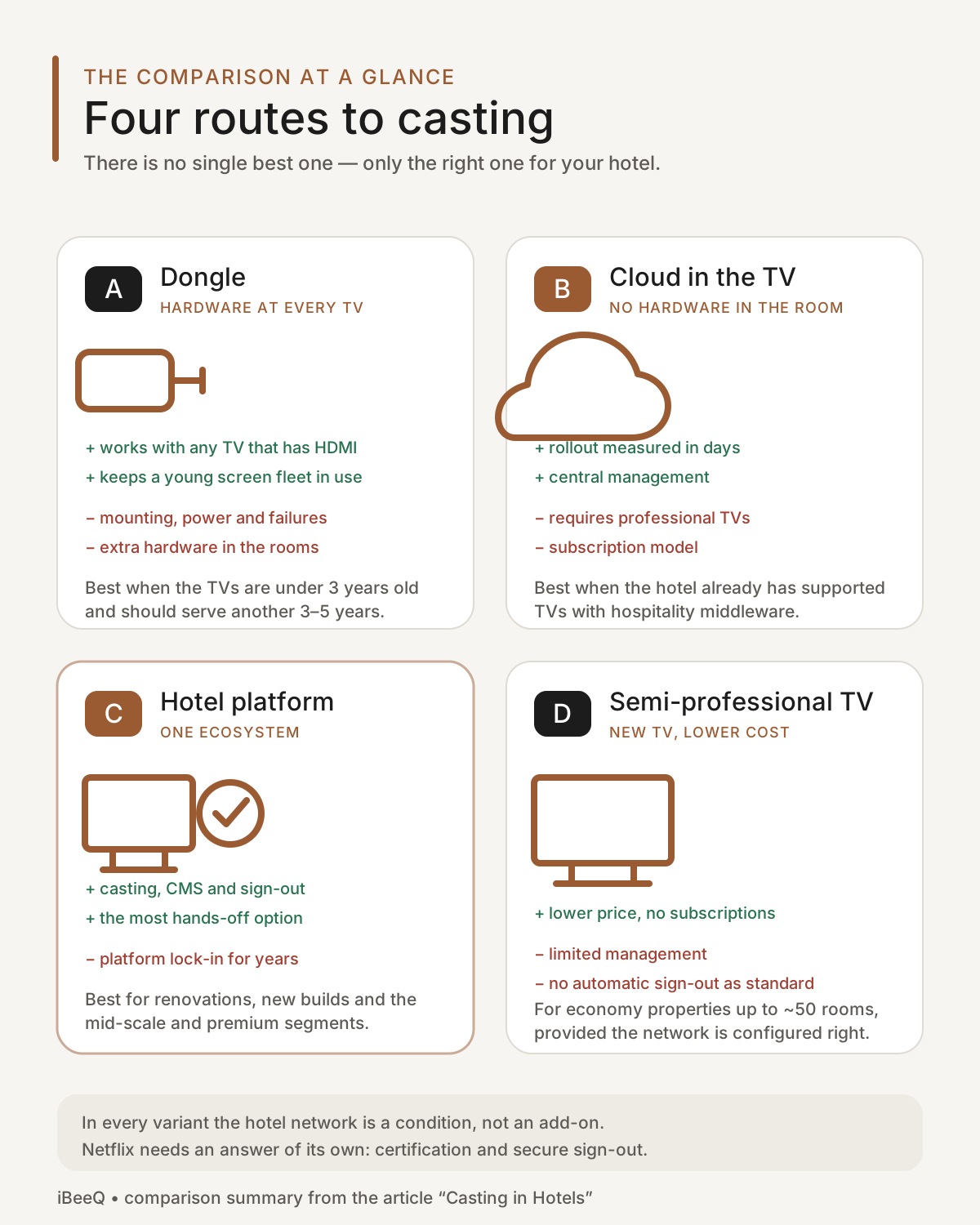
Option A: a dongle behind every TV
The easiest to picture: a small device plugged into the HDMI port of every TV, managed from a central server or the cloud. The guest scans a QR code from a card in the room, their phone pairs with that one TV only, and the pairing is broken at checkout.
The biggest advantage: it works with any TV that has an HDMI socket — including a ten-year-old non-smart set bought before the last renovation. If you have a working fleet of TVs without a hospitality mode and no plans to replace them, this is the only route that does not involve buying new screens.
The disadvantages follow from the same fact: it is a physical device in every room. It has to be mounted, powered (not every TV has a USB port that supplies enough current), hidden from the guest and then looked after for years — replaced after failures, found again after housekeeping unplugs it, bought again after it “goes missing”. In a hundred-room hotel that is a hundred more devices to keep an eye on. Add a server or management subscription, without which the whole system is just a collection of home dongles with all the problems described above.
Who it suits: hotels with a relatively young TV fleet lacking a professional hospitality mode, no replacement planned for 3–5 years, and technical staff on site.
Option B: cloud casting running directly inside the hotel TV
Here there is no extra hardware in the room at all. A professional hotel TV carries built-in software (so-called middleware) capable of displaying a web application — and that is where the casting receiver runs. One network gateway serves the whole property regardless of room count, and management sits in the provider’s cloud.
Advantages: zero hardware in rooms, rollout measured in days, one fee per property plus a per-room subscription. Nothing to steal or replace. If the hotel already has professional hospitality TVs (or is buying them now), this is the fastest route to casting there is.
Disadvantages: the hard condition — the TV must have professional hospitality middleware capable of displaying an application. In practice, two or three leading hotel TV platforms meet it; a consumer smart TV, however new, will not. Second: the cloud casting service handles the Google Cast protocol; AirPlay and Miracast depend on what the TV itself can do, not on the service. A good provider will tell you so up front. Third: it is a subscription model, so the cost grows over time — though, as we show below, more slowly than the cost of maintaining dongles.
Who it suits: hotels that have or are buying professional hospitality TVs and want to avoid hardware in rooms and servers of their own.
Option C: casting built into the hotel TV platform
The third route is casting as a feature of the TV management system (CMS) rather than a separate service. The guest sees it in the welcome menu alongside channels, hotel information and streaming apps. The hotel has one supplier, one contract and one panel in which casting is one tab — next to clearing guest data at checkout, PMS integration and Netflix sign-in by code.
This is the most hands-off of the four and the only one where Netflix’s requirements (guest’s own account, certification, automatic sign-out) are met out of the box. The price of that comfort is dependence on an ecosystem: choosing a TV platform is a choice for the set’s entire lifetime, 7–10 years. It is also worth knowing that not every TV brand has a hospitality platform of its own — some manufacturers offer only a “hotel mode” in the menu that locks settings but provides neither fleet management nor casting. That gap is filled today by third-party CMS systems that can run several TV brands at once — a real advantage for a hotel replacing sets floor by floor, because the system looks the same on the old floor and the new one.
Who it suits: new builds and renovations, four- and five-star properties, chains that require a uniform experience in every room.
Option D: “semi-professional” TVs with built-in apps
The fourth route is a phenomenon of the last two or three years: consumer TVs running systems such as VIDAA or hospitality variants of Google TV, noticeably cheaper than professional hotel TVs, but with casting, Netflix and other apps out of the box and a basic hotel mode in the menu.
The advantages are obvious: hardware a third to a half cheaper than a professional hotel TV of the same size, no subscriptions, casting and apps at no extra charge. For a guesthouse, an aparthotel or an economy hotel of up to fifty rooms, this is often enough.
The disadvantages deserve honest naming. First, casting in such a TV is home casting — isolation between rooms has to be built into the hotel’s Wi-Fi (more on that shortly), and without it we are back to “room 204 can see room 301”. Second, fleet management is limited or absent: settings are changed with the remote, room by room. Third, automatic clearing of guest data at checkout is not standard — a guest who signs in to Netflix with the remote will leave their account for the next one unless the hotel introduces a manual reset routine or an external management system. Note too that one large manufacturer is dropping Google Cast from its 2026 consumer TVs while keeping it in its hospitality line — a signal that “casting in a TV from the electronics store” is no guarantee for years to come.
Who it suits: economy properties, apartments, guesthouses and hotels up to about 50 rooms on a tight budget — provided the network is properly configured.
The four options compared
| Criterion | A. Dongle | B. Cloud in hotel TV | C. Built into platform | D. Semi-professional TV |
|---|---|---|---|---|
| Works with your existing TVs? | yes — anything with HDMI | professional hotel TVs only | selected platforms only | no — requires new TVs |
| Hardware in the room | dongle + power | none | none | none |
| Central hardware | server or cloud | one gateway per property | part of the CMS | none |
| Google Cast / AirPlay / Miracast | depends on dongle (usually Cast, sometimes AirPlay) | Cast from the service; AirPlay and Miracast from the TV | usually all three | Cast usually; AirPlay often; Miracast rarely |
| Pairing with own room only | yes | yes | yes | only through network configuration |
| Data wiped at checkout | yes | yes | yes (with PMS integration) | not as standard |
| Whole fleet managed from one panel | yes (own panel) | yes | yes (same panel as the TV) | limited |
| Netflix after the December 2025 change | only on discontinued 3rd-gen dongles | yes — via the hotel receiver | app + certification + auto sign-out | app present; manual sign-out |
| Upfront cost | high (hardware × rooms) | low | in the TV + CMS price | price of new TVs |
| Recurring cost | medium (licence + replacements) | subscription | within the CMS licence | none |
| Time to deploy | weeks (installation in rooms) | days | with the TV rollout | with the TV replacement |
| Main risk | theft, failures, power | dependence on the cloud provider | platform lock-in | no hospitality support |
| Sensible horizon | 3–5 years | as long as the TV supports the middleware | TV lifetime (7–10 years) | 5–7 years |
The network: the condition the brochures leave out
Whichever route you choose, casting in every variant makes two seemingly contradictory demands of the hotel network: the guest’s phone has to “see” the TV in their room, and at the same time must not see the TVs in other rooms. A home network meets the first and knows nothing of the second. A typical older hotel network, designed so that guests cannot see each other (correctly so), fails the first — phone and TV are isolated from each other and casting “doesn’t work” even though the hardware is fine.
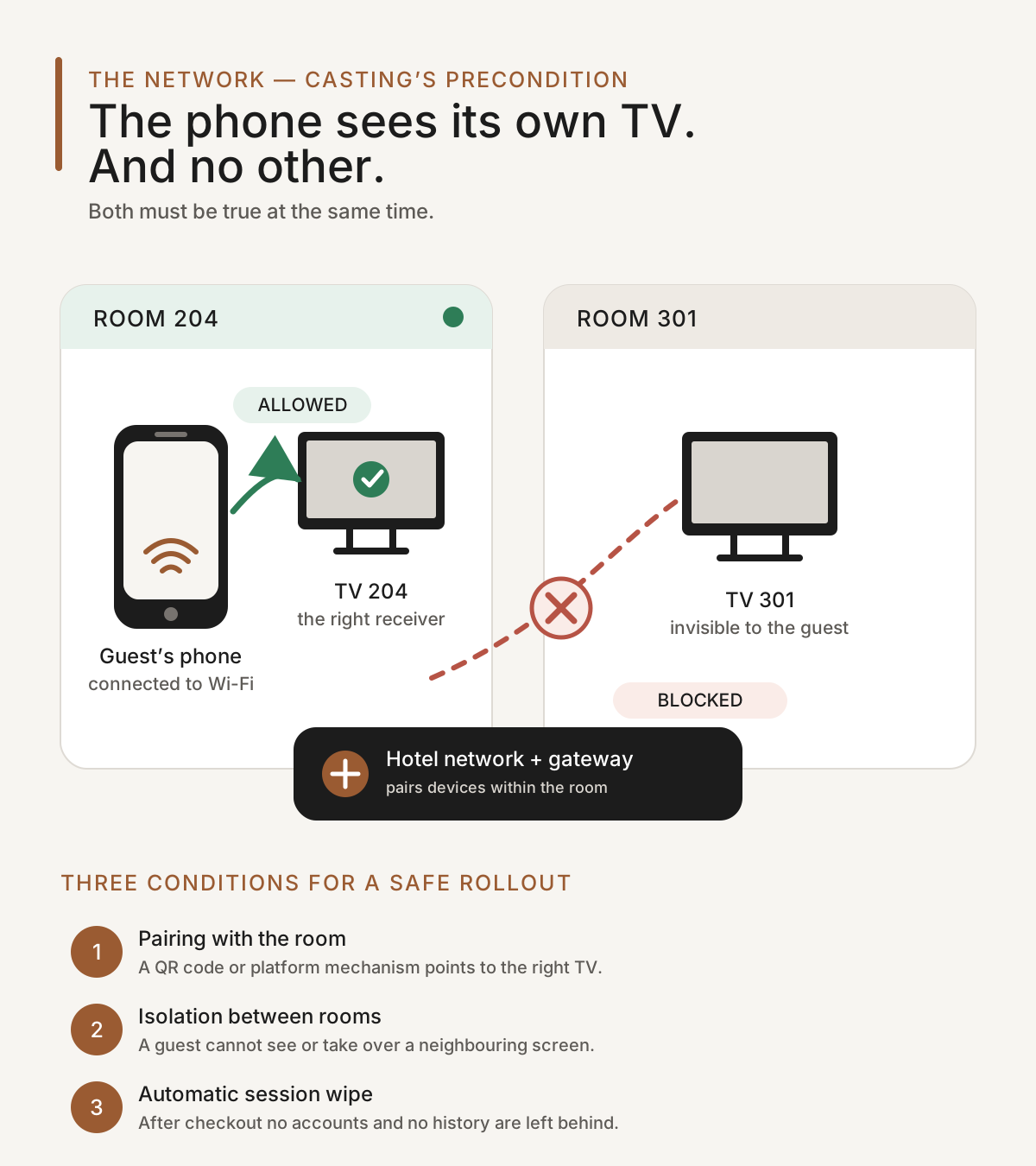
This is the most common post-installation complaint we encounter: the hotel bought a solution and nobody checked whether the network could pair devices within a room. Options A, B and C carry built-in mechanisms that get around the problem (QR-code pairing, network gateways), but they still need the Wi-Fi and wired network configured for them. Option D depends on it absolutely, because it has no mechanisms of its own. The practical conclusion: before you buy anything in this article, ask for a network audit — it often turns out that adapting the network is a significant part of the whole project, and sometimes that the network, not the TVs, is the real problem.
What it costs
The figures below are indicative orders of magnitude for the Central European market, per room, excluding VAT. They are not an offer — their purpose is to show the proportions between the routes, not to replace a quotation. We deliberately omit prices for TV management system licences: they depend on the platform, the number of rooms and contract length, and within the same functional class they differ mainly in how much deployment and support is included in the price.
| Route | Upfront cost per room | Recurring cost per room / month | Fixed fees per property | Notes |
|---|---|---|---|---|
| A. Dongle | €70–190 (device, installation, power) | €2–5 (management licence) | server or cloud: €0–1,200 one-off | + reserve ~10% of hardware for replacements over 5 years |
| B. Cloud in hotel TV | ~€0 if hotel TVs are already in place | €1.5–2.5 | €75–95 / month + €370–465 setup | requires professional hotel TVs |
| C. Built into platform | price of a professional hotel TV: €500–800 (43”) | within the CMS licence | platform deployment | one contract for TV, CMS and casting |
| D. Semi-professional TV | €280–420 (43”) | €0 | network adaptation: €1,200–3,500 | no management, no auto sign-out |
Let us see how that looks in two model hotels: 50 rooms over 3 years and 150 rooms over 5 years. The figures follow directly from the ranges above — the lower bound is the cheapest variant of each route, the upper bound the most expensive.
| Route | 50 rooms, 3 years | 150 rooms, 5 years | What the hotel has afterwards |
|---|---|---|---|
| A. Dongle | €7–19k | €28–74k | old TVs + worn-out dongles |
| B. Cloud in hotel TV | €6–8k | €17–27k | the same hotel TVs, service to renew |
| C. Built into platform | €26–41k for TVs + CMS licence | €77–122k for TVs + CMS licence | new professional TVs with 5–7 years ahead of them |
| D. Semi-professional TV | €15–24k (incl. network) | €43–66k (incl. network) | new TVs, no subscriptions |
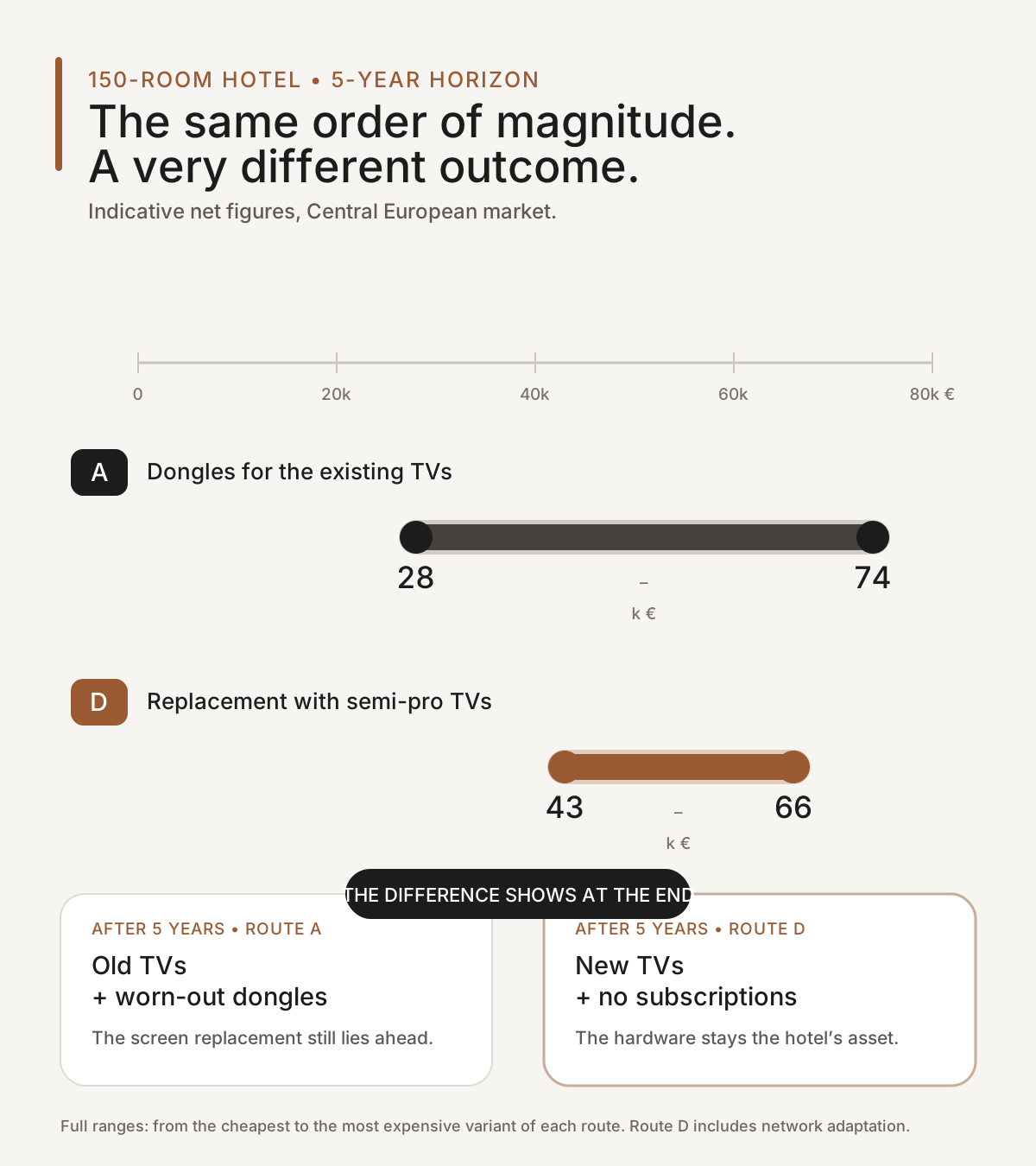
This table yields the conclusion this article was written for. In a 150-room hotel with old TVs, the five-year cost of dongles (route A) is in the same order of magnitude as the cost of replacing the TVs with semi-professional sets (route D) — mid-points of roughly €51k against €55k — with the difference that after five years the hotel in variant A still has old TVs, while in variant D it has new ones. Mind the spread, though: route A is far wider, because it compounds the price of a single dongle with the management licence rate. With cheap hardware and a cheap subscription, dongles land clearly below new screens; with expensive ones, clearly above. In other words: adding to old equipment only pays off when that equipment is young and has several years left in it. For old TVs, “patching” costs more than replacing — the cost is simply spread over time and therefore less visible.
Route B is the cheapest in both scenarios — but only for a hotel that already has professional hospitality TVs. For a hotel that would first have to buy them, route B becomes route C.
Patch or replace? Five questions that decide
The decision comes down to five questions about your hotel:
- How old are the current TVs? Under three years, three to six, or over six?
- Do they have professional hospitality middleware (a management platform), just a “hotel mode” in the menu, or nothing?
- Is a room renovation or TV replacement planned within two years for other reasons?
- How many rooms? Under 50, 50–150, or over 150?
- What segment, what guests? Economy, mid-scale, or premium?
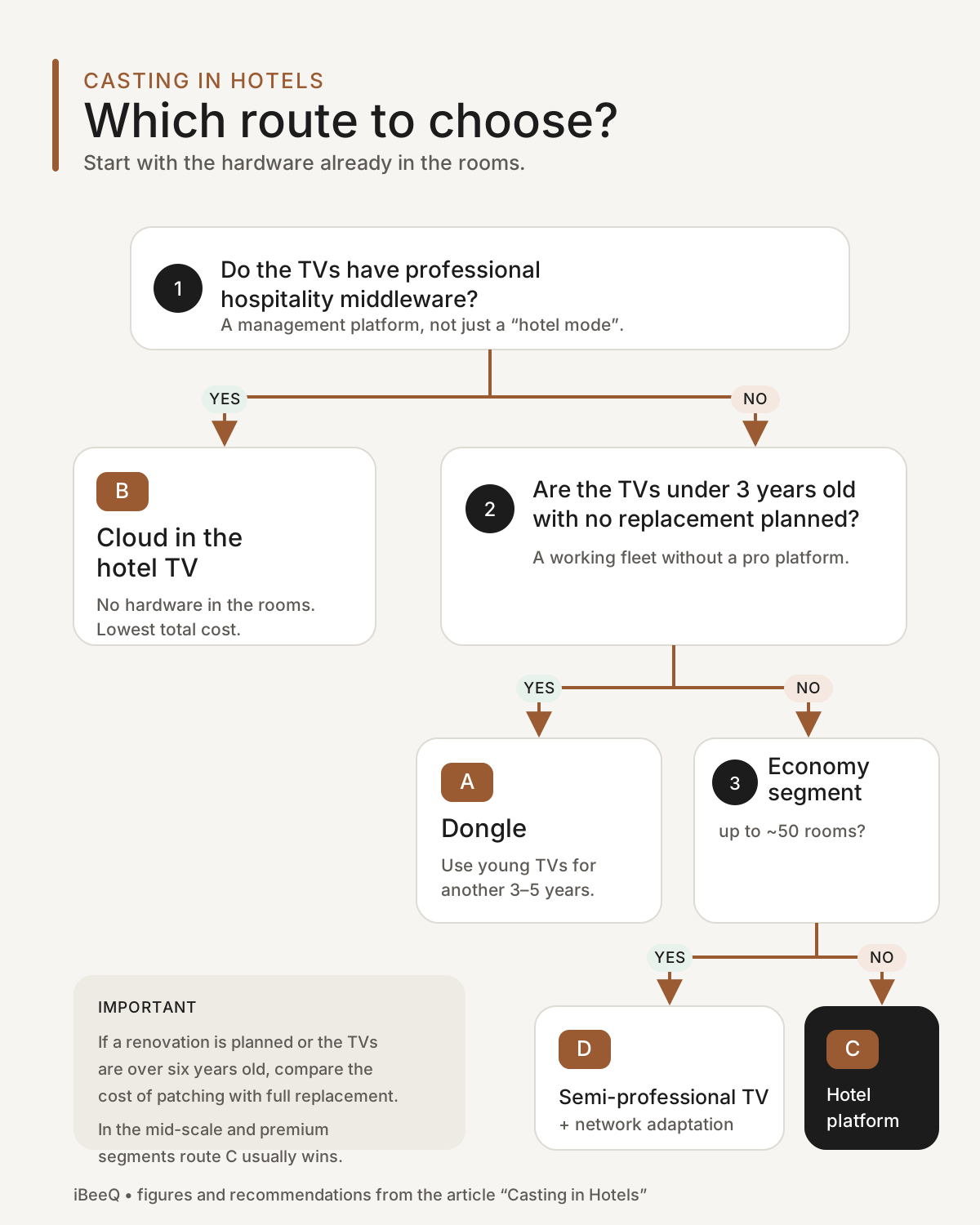
| Your hotel’s situation | Recommended route | Why |
|---|---|---|
| TVs under 3 years old, no middleware, no replacement planned | A. Dongle | the only way to use working hardware; cost spread over the years the TVs would serve anyway |
| TVs with professional hospitality middleware (any age, as long as supported) | B. Cloud | no hardware in the room, rollout in days, lowest total cost |
| Renovation or new build, mid-scale and up | C. Built into platform | one contract for the TV’s whole lifetime; Netflix requirements met from day one |
| TVs over 6 years old, economy segment, up to ~50 rooms | D. Semi-professional TV + network adaptation | replacing is cheaper than patching; no subscriptions |
| TVs over 6 years old, mid-scale or premium | C. (replacement with professional hotel TVs) | guests in this segment expect full functionality and privacy |
| Mixed property: some floors renovated, some not | C. with a multi-brand CMS | uniform guest experience despite different hardware; phased replacement without changing the system |
A simple rule to finish: working hardware without a hospitality mode → dongle; professional hotel TVs → cloud or built-in feature; old hardware → replace, and let the hotel’s segment decide with what.
Five mistakes we see most often
Buying consumer dongles “because they’re cheap”. No isolation between rooms, no data clearing, no management — and since December 2025, no Netflix. A saving on hardware, a cost in reputation.
Deploying casting without checking the network. The most common reason for “we have casting but it doesn’t work”. A network audit before purchase costs a fraction of a rebuild afterwards.
Semi-professional TVs in a premium hotel. A guest in a four-star hotel who has to type their Netflix password with the remote, then wonders whether they deleted it, won’t come back — and won’t say why.
A cloud subscription on TVs that lose support next year. Before signing, ask the TV manufacturer how long the platform will be updated.
No procedure for guest data. If the system doesn’t wipe it at checkout, a member of staff has to — every day, in every room. In practice, nobody does.
Summary
Casting in a hotel is no longer a question of whether but of which of the four routes. The choice depends less on which technology is “best” and more on what is in your rooms today: young hardware without a hospitality mode justifies dongles, professional hotel TVs open the cloud route, and old hardware — counter-intuitively — is cheapest to replace rather than patch. In every variant the hotel network is a condition, not an add-on, and Netflix needs an answer of its own.
Would you like to know which row of the decision table your hotel sits in? Get in touch — all we need is a list of your current TV models and a short description of the network. On that basis we will point to the route and the order of magnitude of the cost, free of charge and without obligation.
Frequently asked questions
Is an ordinary Chromecast enough for a hotel?
No. A consumer device assumes everyone on the network is one household: the guest in room 204 can see the TV in room 301, nothing is cleared at checkout, and the hotel has no panel showing which devices work. Since December 2025, Netflix has also stopped casting to new Chromecast devices altogether.
After the Netflix change, does hotel casting still make sense?
Yes. Netflix restricted the list of recognised receivers, not the protocol, so professional hotel casting solutions still support Netflix. Guests on the ad-supported plan end up in the TV app regardless — which is why a TV with a Netflix app and automatic sign-out at checkout is the second pillar for any hotel serious about streaming.
Should I add dongles to old TVs or replace the TVs?
In a 150-room hotel, five years of dongles falls in the same order of magnitude as replacing the sets with semi-professional TVs — except that after five years the first scenario leaves you with old TVs and the second with new ones. The spread on dongles is wider, though: it depends on the price of the device and the licence rate. Adding to ageing equipment only makes sense when that equipment is young and has years left.
Why does casting “not work” when the hardware is fine?
Almost always the network. The guest’s phone has to see the TV in their own room but not the TVs elsewhere. Older hotel networks isolate every user from every other, which makes same-room pairing impossible. This is the most common complaint after a casting rollout.
Is a TV from an electronics store suitable for a hotel?
For a budget property, an aparthotel or a guesthouse under roughly 50 rooms — often yes, with a properly configured network. But accept three limitations: the casting is consumer-grade, fleet management is limited or absent, and automatic data clearing at checkout is not standard.
Planning a hotel technology upgrade?
Our engineers have implemented hotel TV and WiFi systems across hundreds of properties in Europe. Let's talk about your project.
Contact us